- Fresh Start: Exploring the Island Architecture
- Let's Rewind
- About Islands (Island Architecture)
- Initial Commit
- Static Elements
- Dynamic Elements
- The Rest of the Stack
- DaisyUI
- Chroma.JS
- Sceleton
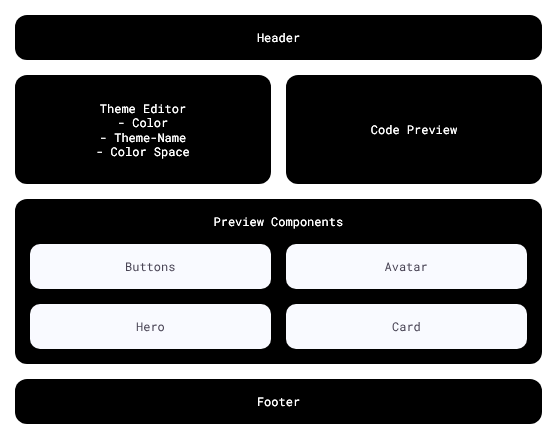
- Desktop Layout
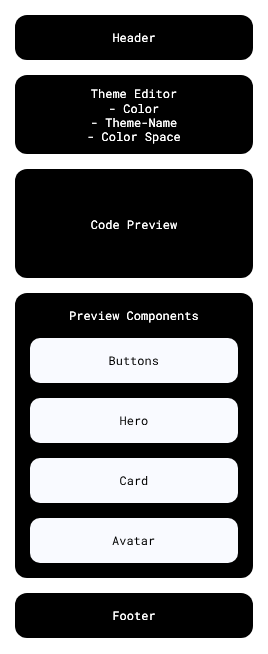
- Mobile Layout
Fresh Start: Exploring the Island Architecture
Imagine waking up and suddenly finding yourself in a completely different place. It might sound a bit melodramatic, but that’s exactly how it feels when, as a die-hard React disciple, you finally take a look at the Island Architecture and how it functions. To explore this, I'm kicking off a project in this blog using Deno's relatively new full-stack framework: Fresh.
Let's Rewind
Recently, after I — like any sensible person — switched from Vercel to Netlify and realized I could finally host Deno projects there, a friend introduced me to Fresh in that very context: Deno’s in-house full-stack framework.
"Great," I thought at first, "yet another full-stack framework."
Side note: I had just recently gone down the Nuxt rabbit hole. From the outside, it looked nice—a likable alternative to the giant that is Next.js. But it quickly turned into documentation hell. Many usable plugins were poorly or inconsistently documented. To understand one set of docs, you often had to read another, as it turned out Nuxt relies on a stack of other technologies (Nitro, Vite, Vue, and many more). That’s not inherently bad, but often, when the Nuxt docs hit a wall, they simply pointed you to the documentation of the underlying technology. Maybe I'll go back someday, but for now, Next.js has won me back.
Back to the main topic: I found myself facing a completely new technology again. As I briefly browsed the docs, the aforementioned friend mentioned that Fresh also works with Islands, just like Astro. Astro remains an unfulfilled dream of mine to this day—one I will surely pursue soon. Surely 👀.
In any case, I saw JSX and felt right at home, so I thought, "Why not?"
Now, with plenty of coffee and matcha latte pumping through my veins, I’m hyped to check out Fresh. Where do you start? The documentation, of course.
About Islands (Island Architecture)
The Island Architecture shines where websites are predominantly static.
On a high "static sea," Islands are small, casually rendered dynamic components that stand on their own. They are largely independent of the static components surrounding them.
For example:
- React's architecture is built so that the entire content is mostly rendered within a so-called "root" element on the client and is fully hydrated (made interactive). This makes React great for dynamic Single-Page Applications (SPAs).
- Next.js gets closer to generating content server-side, but it also hydrates everything from start to finish.
In contrast, the concept of Islands is Static First. The majority of the page is static, apart from a few components, precisely these so-called Islands. And only these Islands are hydrated and rendered by the client.
Unlike the React approach, a page using the Island Architecture would still be displayed, even if a single "Island" encounters an error.
If you want to read more about island-architecture you can read this nice article.
Initial Commit
Initialization is as simple as ever. But initialization is one thing; what I actually do with it is another.
deno run -Ar jsr:@fresh/initToday, we are building a Tailwind Theme Generator. This gives me a wonderful balance between dynamic and static elements.
Static Elements
- Header
- Footer
- Preview Components
- Card
- Avatar
- Hero
- Buttons
Dynamic Elements
- Color Selector
- Color Space Selector
- Oklch
- Hsl
- Rgb
- Hex
- Theme Name Input
- Theme Code Preview
This way, we have components that share state and components that remain static. That’s the plan.
The Rest of the Stack
Fresh comes out of the box with Tailwind, a good old friend and a companion through all the ups and downs.
To keep things interesting, my second-best friend when it comes to styling is also included:
DaisyUI
DaisyUI is less of a component system like MUI or NextUI. In fact, DaisyUI feels more like Bootstrap in some respects, with one significant difference: Everything is CSS. For a carousel, I don't need a JS plugin—neither vanilla nor for JQuery. DaisyUI is also completely based on native HTML components (like dialog, details, fieldset, etc.), which not only makes the code more understandable but also more accessible.
Add DaisyUI:
deno i -D npm:daisyui@latestAdd DaisyUI to styles.css:
@import "tailwindcss";
+ @plugin "daisyui";
DaisyUI comes with a completely CSS-based theming system, pre-built themes, and simple components that can be transferred to any framework.
What DaisyUI also provides is perhaps less of a feature and more of a hack: the themes can be styled completely dynamically through CSS variables. This allows me to color the components—which are to be colored by the chosen theme—entirely using pre-defined CSS variables. This saves me not only additional JS rendering but also time.
Chroma.JS
One of the classical ones when it comes to working with colors is Chroma.js. It is a little simple package which can easily convert any color space to another color space, brighten and darken colors and their attributes (hue, lightness, alpha, etc.). It will help us to calculate the colors for the theme and to switch the color spaces.
Just type in:
npm install chroma-js
Sceleton
With Penpot I created this little skeleton for the application.
Desktop Layout
Mobile Layout
This my dear friend is it for today. Was fun to write this article. If you don't want to miss any following posts, follow my RSS-Feed.